Showing posts with label technology. Show all posts

iPad Organization 101 +Apps

Hi everyone!!! How's back to school going? We are already in our 5th week!?! Can you believe that?? It's crazy for several reasons!!

1. We just received the first midterm email while I only have 1 grade in the computer (papers are graded though haha:).

2. I feel like I'm still in the first week of school with the new Reading Wonders series along with looping with my kids. The looping part has been great! I definitely can see why people move up even though I absolutely love 2nd grade. I envision loving 3rd just as much! (or come back and ask me once testing comes around...may be a different picture by then!)

AND

3. This means that formal evaluations start in 2 weeks!! yikes! :)

Anyway :)...as the year gets going for everyone, I thought I'd share how I organizational tips with you on technology! I can say I fell in love with Apple the minute I bought my iPhone 4. Then came the iPad. The day I stood in line for this, I asked a worker if they were hiring. I went to a hiring event, interviewed, and the rest is history (including any money I thought I ever had...can't resist Mac)! hah I worked part time at my nearby Apple store for a year and a half. I LOVED it! I got to teach workshops, learn all about them, get trained to fix them, and meet a ton of awesome people. SOOOO, now I am basically the Apple person at my school which I'm fine with!  I've gained 4 iPad minis through township grants, and bought 2 on my own with the huge Target sale. Then I keep my old phones to use as iPod touches as well. So way too much information, I'm sure, so let me get to the tips about organizing your technology and some apps I love and use (although I'm constantly finding great, new ones, too)!! :) I am a very visual person so get ready for lots of photos!!

Let's talk set-up!

OUTSIDE: I store all of my iPads in this wonderful 6-drawer rolling cart I bought from Walmart! I used Learning in Wonderland's, Let's Get Organized Set, for the awesome labels to give them each a home. On top of the cart, I keep my Daily 5 Listen to Reading student check off sheet with a wipe off marker on velcro. They use the iPads during this.
INSIDE: I store the charging cord in a baggy to keep it contained along with the iPad. I'm in the process of buying more headphone splitters to add to these as you see in the picture below. The iPad cases are awesome! The are called Caseformers, and you can find them here on Amazon. I love that there is a cover that is also magnetic to put it to sleep. It also allows for 2 ways to set the iPad down. The corners are thicker and designed to hold impact (let's hope we don't test it out, though :). I was going to color code them to the labels (I'm OCD like that hah), but instead I'm going to put the numbers on the screens.
HEADPHONE SPLITTERS: If you don't have one of these, go get one!!! This one is a Belkin Rockstar 5-Way splitter. You can find it here on Amazon. Previously, I used the 2-way splitters from Best Buy that cost $4.99. Well, one of those broke off in an iPad last year which in turn had to be replaced. So I'm sticking to this Belkin, and I'm in charge of plugging them in! hah The 2-way splitters are great too. Just make sure to model, model, model how you want them to be used. I always had them in there so they didn't have to push or pull on them. However, as you read, one did break off. hah So just have them be careful. My kids are really great with the iPads so I know it probably was not the best made product. :) I'm giving my students the benefit of the doubt because they're wonderful!!! :)

Let's talk app organization!

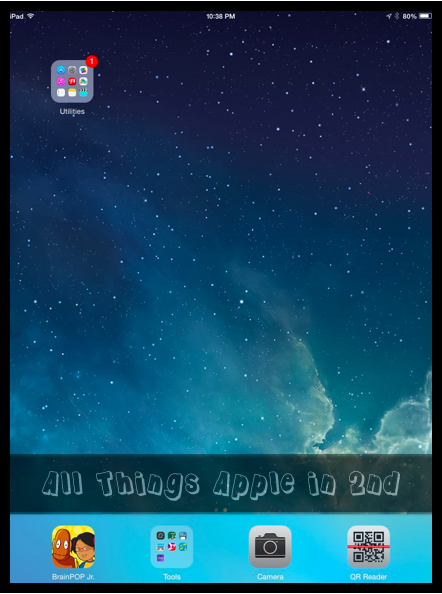
FOLDERS: I'm all about the FOLDERS! :) I organize my folders in the order that they use them in the day. Listen to Reading is the first chance to use the iPads so it's first on the screen. 2nd is reading rotations. I made 4 folders for the iPad reading rotation. When the kids have iPads for their daily rotation, they have 2 options. Based on their reading levels and book clubs, they have been given a number 1-4. My 1s are the lowest group with my 4s being the highest. I separated apps into each folder so I could differentiate the apps more. Now, they can practice at their levels. They can also choose the folder labeled Reading Games. These are more game like reading apps whereas the others are reading passages and answering questions. I also have a folder for my newcomer EL kids to focus in on what they need. The rest of the folders have EM (Everyday Math) games, other math games, phonics, social studies, science, and apps that could fit in more than one are by themselves. 

Along the bottom, I put the apps that are used a lot. BrainPop, camera, QR Reader, and a folder with student tools apps which you can see more of below. :) 

The folders make my life as well as my students so much easier!!! :)

TIP: If you have multiple iPads, set one of the iPads up the way you want it with iCloud on mainly just to back the one up. Then when you go to set-up the new ones, you can set it up from the backup. I already had the iPads, so I erased the content and settings from the General tab, and set it up again. SO MUCH EASIER than doing them all separately! 

Finally, let's talk apps!

I am going to show you what apps are inside each folder I explained above!
If you want to read more about how I use and have used technology with the Daily 5, check out my post, A Touch of Technology for the Daily 5!!


If you have any EL kiddos that are newcomers or speak a minimal amount of English, you HAVE to check out the app, Fun English!!! It's AMAZING!! In fact, ALL of my kids would pick to go on that app! There is a free version, but the paid version is worth EVERY penny!!! I saw one of my EL students smile and laugh for the first time playing on this app last year! I almost cried!


This is the second screen where I have made a folder for all of the permanent apps to keep them out of sight! :) Not that any student EVER goes wondering around a device or anything! HA 

There you have it!!! A little glimpse of how I set up and use my iPads in my classroom! I hope this post helps make iPads efficient and fun in your classroom!! 

Do you have tips of your own, feel free to comment below to share with everyone!! Also, if you have a favorite app you use, I would love to know!!! :)

Wishing everyone a wonderful start to the new year (if it's new right now for you :)!! 
Happy teaching!!

A TOUCH of Technology for the Daily 5

WELCOME to the...

I'm sooo excited that you're joining us as we share over 135 AMAZING ideas!!! You are going to be blown away by all the awesome bloggers!!! So get a drink, prop up your feet, and settle in to learning about all kinds of innovative and exciting ideas. 

A TOUCH of Technology during the Daily 5: Listen to Reading
I'm going to tell you about how I include technology during our Daily 5 time each day.  Everyone that knows me knows I LOVE technology, but sometimes, it can be difficult to figure out how to include it into daily routines.  This year is the first year I'm actually using the Daily 5 approach even though many of the activities I've done prior to now have been pretty similar.  With our schedule, we only do 1 part of the Daily 5 each day, but my students get to choose which one they want to do.  They have 20 minutes once they start.  Here are their choices.

Computers: Here, they listen to stories on the awesome website Storyline Online!  If you haven't been to this website, run to it! :)  Celebrities read aloud popular children's picture books!  My kids LOVE it!!! I have a shortcut on the desktop so it's quick and easy for them to get to when they sit down.  Once they listen to one store, they complete a story rating and response page which they also love.  If they have time, they get to listen to another story.  They only have to do one response sheet.


TV: If ya'll (I've always wanted to say "ya'll" :) are like me, objects from my house seem to migrate to my classroom!!  So the day I decided I didn't need a TV in my bedroom seeing that I didn't even use it much, I brought it to my classroom.  So here, I have Scholastic Storybook Treasures books on DVDs that I bought at Sam's Club.  They have all the classics. I pick the DVD for the week that has about 5 or 6 stories on it. You can have close captioning or not.  Just as with the computers, they complete a story response rating sheet after one story.  Then they can listen to another.  I also have a laminated card with a picture of the remote control labeled for how to use it! :)

       
iPads/iPhone: Finally, my kids can also pick to listen to a story on the iPads/iPhone.  ALERT!!! Now, if you only have 1 or 2 iPads in your room, don't fear!! You can buy a splitter where you can have up to 5 kids with headphones on one device!!! Solves that problem! :) I was so pleasantly surprised when I saw the reactions on my kids faces when I was showing them the new iBooks and Scholastic Storia apps that I added to the Listen to Reading part of Daily 5!! I guess I shouldn't be shocked, right?!? hah However, I was!  They CHEERED!  iBooks has children's books along with ones that read aloud.  Scholastic Storia has their books that you can purchase as e-Books. With Storia, you can set up different libraries for certain kids, or put them all in one.  There are tons of options!  You can also record yourself reading books from your classroom libraries and sync them with iTunes.  Then you simply put it onto the device you want.  This could be done with QR codes as well where the kids would scan the QR code which would take them to your recording.  Then they have the book in front of them, and you personally reading it to them!! :)


TADA! :)
As you can see, this allows my kids to have several avenues of listening to literature through technology within the Listen to Reading part of the Daily 5.  I am just sooo excited with how much they love this!  They are so engaged in this for the whole, entire 20 minutes.  


Thanks so much for stopping by to learn about using technology during the Daily 5! I loved having you!! :)  

Are you ready for some more BRIGHT ideas?!? Hop on over to the next one up by Ciera Harris at Adventures of Room 129!! You'll learn all about organizing files and center activities!! What teacher doesn't love some organization?!? :)
You can also search below if you are looking for specific ideas!  Happy blogging and welcome again to the Bright Ideas Blog Hop! 

Tune into Technology Linky: Integrating Technology into Reading

I'm so excited to link up with iTeach 1:1 and Learning to the Core for their new Tune into Technology!! I LOVE integrating technology throughout the day! The kids love it! Our students now are growing up with this technology so it's not going anywhere so might as well embrace it and go with it!!! :) 

I absolutely love the ideas that iTeach 1:1 left on her post! When I do reading, I have 3 rotations: 1 with me, 1 with my co-teacher for reading, and 1 independent technology rotation. During the independent technology rotation, I have 2-4 kids on the laptops working on Successmaker which is through Pearson. I have 2 other kids on the SmartBoard working on spelling activities, and I have 2 on iPads with which they get to choose the reading app they want to play.  This way that small group of 6-9 are still working in even smaller groups which minimizes interruptions helps the kids stay focused. If you look at the picture below, this is how I organize my groups for the rotations. The cards are for their activity during their independent time. The big arrow designates the kids who are the "teachers" of the group so if anyone has a question or needs help, those are the two that can help. This helps tremendously so that they aren't interrupting our reading group instruction. We also talk about what to do if they still can't get to work. They would separate and join in with one of the other groups or read a book and do a reading response sheet.

Some of the apps that they love are...
With the above app, you can assign kids to this level or the next level that is the next app Level 2. It will keep track of the passages they read along with the questions they answered showing their results with how many attempts.
My kids love this app!! It has several games but one of my favorites is the tetris style game. High frequency words fall from the top, and a voice speaks the word. Then they have to tap them before the speaker says another word. 
This app is great!!! It's for several grade levels and skills like prefixes, synonyms, antonyms, suffixes.and so on! Two students play against each other and have to make matches, but there could be a storm that blows in that stops them for a second. So fun!!

These apps are their top pick apps!! 

One program and app that I found through blogs and online was nearpod. This website and app is AMAZING!!! I will do a more detailed post soon with step by step notes on how to use it. I used this during my reading rotation, and my kids were astonished! The looks on their faces were priceless!!

You start with your own PDF that you make which you can export PowerPoint, Keynote, Word, or Pages documents as PDFs. Once you're done, you go to www.nearpod.com and drag the document into the website. You can add polls, quizzes, videos, etc.!! Then you are in charge of the slideshow. You also get realtime results as they're going through it with you!! 

I am on my way to the airport right now for a family reunion in Arizona so I have to cut this short! :) However, I would highly recommend looking into this program and app!! I will do a  more thorough blog post of this program when I get back!!! :)

Thanks for stopping by!!! :)